Specification
Ports overview
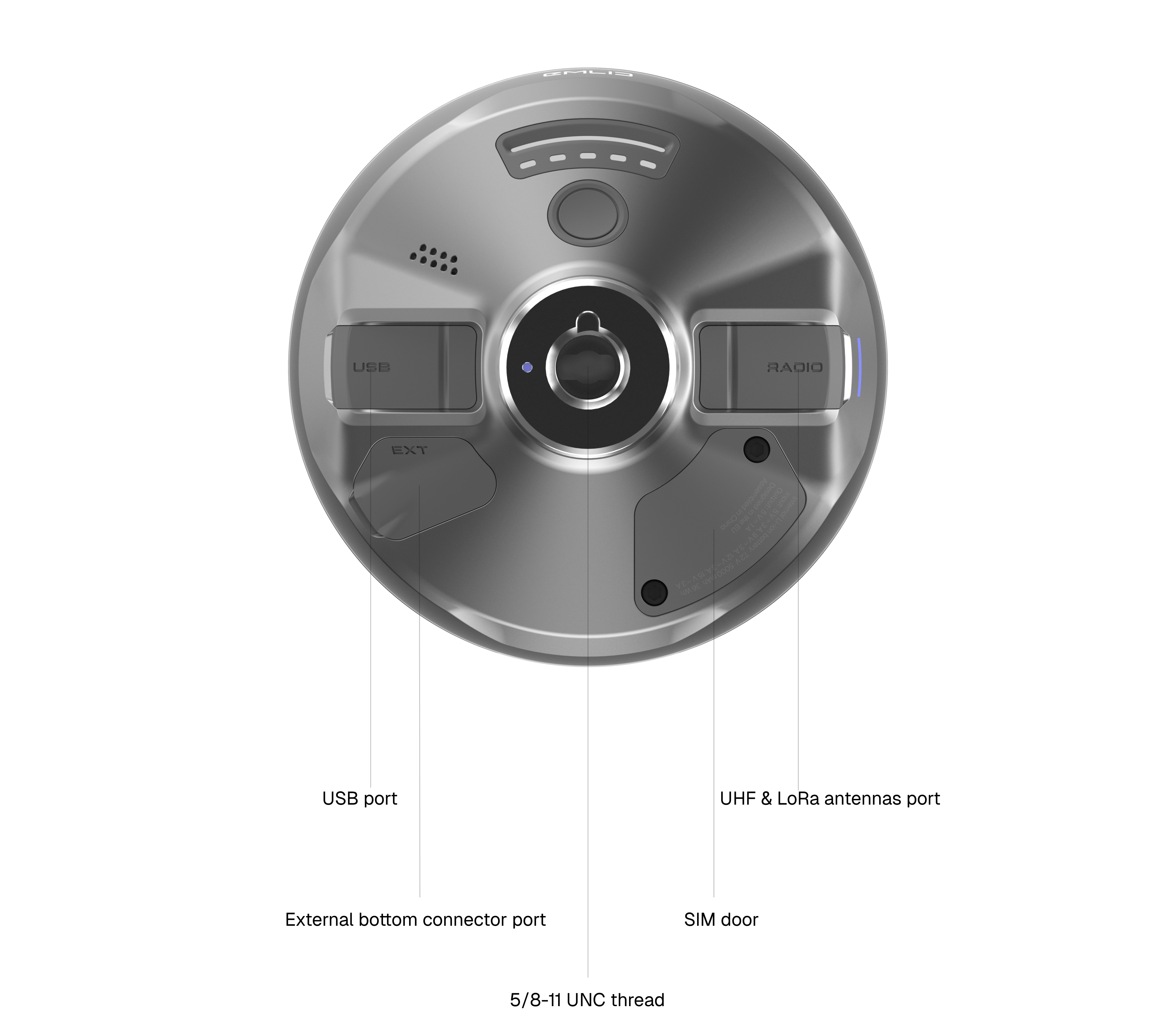
SIM card slot
Reach RS4 / RS4 Pro has a built-in LTE modem with 3G/2G fallback and global coverage. To receive NTRIP corrections, simply insert a GSM nano-SIM card into the receiver and follow the Connecting Reach to the Internet via built-in modem guide to set up the cellular connection.
External bottom connector
Reach RS4 / RS4 Pro has an external 8-pin bottom connector that supports the following use cases:
-
Supply constant power from an external battery. In Emlid Flow, configure the receiver to turn on when external power is connected and turn off when it's disconnected. This is useful for setting up Reach RS4 / RS4 Pro as a permanent base or integrating it with a tractor for precision agriculture.
-
Establish RTK communication with third-party devices. Connect an external radio via the external bottom connector and stream corrections over the RS-232 serial protocol.
-
Stream the receiver position to other devices or third-party apps. Connect a device via the external bottom connector and stream position over the RS-232 serial protocol. Enable Position streaming in Emlid Flow.
USB Type-C port
The Reach RS4 / RS4 Pro receiver is charged via a USB Type-C cable connected to a USB Power Delivery-compliant charger supporting 5V⎓3A, 9V⎓3A, 12V⎓3A, 15V⎓3A.
Alternatively, you can use this port to integrate with third-party devices:
-
Connect an external radio to the USB-C port to establish RTK communication with third-party devices.
-
Use the USB Type-C port to stream the receiver position to other devices or third-party apps using the appropriate cable. In this case, enable Position streaming in Emlid Flow.
LoRa & UHF radio antennas port
Reach RS4 / RS4 Pro has built-in LoRa and UHF radios:
-
With the LoRa radio, you can set up RTK communication between two Reach receivers.
-
The UHF radio enables RTK communication between two Reach RS4 / RS4 Pro receivers, between Reach RS4 / RS4 Pro and Reach RS3 receivers, and between the Reach RS4 / RS4 Pro receiver and a third-party receiver.
Attach the LoRa or UHF antenna supplied with the receiver and set up the LoRa or UHF link depending on your setup conditions.
5/8-UNC thread
Reach RS4 / RS4 Pro can be placed on the survey pole or tripod using this thread. You can also use the Emlid Quick Release for comfortable and secure mounting.
Mechanical specs
- Reach RS4
- Reach RS4 Pro
| File name | Download link |
|---|---|
| Reach RS4 general drawing | reachrs4-drawing [PDF, 1.4 MB] |
| Reach RS4 3D model in STEP format | reachrs4 [STEP, 38.6 MB] |
| Reach RS4 3D model in IGES format | reachrs4 [IGES, 43.7 MB] |
| File name | Download link |
|---|---|
| Reach RS4 Pro general drawing | reachrs4pro-drawing [PDF, 1.4 MB] |
| Reach RS4 Pro 3D model in STEP format | reachrs4pro [STEP, 38.6 MB] |
| Reach RS4 Pro 3D model in IGES format | reachrs4pro [IGES, 43.7 MB] |
Antenna height
GNSS antennas are precisely calibrated through the National Geodetic Survey measurements. These calibrations define the antenna phase center (APC).
Emlid Flow applies the correct antenna phase center offset automatically. You need to enter only the height from the ground to the antenna reference point (ARP) on the bottom of the receiver. In Emlid Studio, however, you currently need to enter the antenna phase center offset manually. There, when setting up the antenna height, you need to choose the unknown type in the Receiver field, and add the antenna phase center offset of 95 mm plus the pole height in the Antenna height field.
The antenna phase-center offsets for L1, L2, and L5 are 95 mm, 77 mm, and 80 mm, respectively. If you need more details about Reach RS4 Pro antenna calibration, check out the ANTEX file.
External bottom connector
Reach RS4 / RS4 Pro external bottom connector [PDF, 329 KB ]
Exceeding the absolute maximum ratings may cause permanent damage. These values aren't intended for operation, and performance at these levels isn’t guaranteed. To ensure safe use and long-term reliability, work with the device within the recommended operating conditions.
| Pin number | Pin name | Pin electrical type | Recommended operating conditions | Absolute maximum ratings |
|---|---|---|---|---|
| 1 | GND | Power ground | ||
| 2 | PPS | CMOS output | from 0V to +3.3V | from -0.5 to +6.5V |
| 3 | TIMEMARK | CMOS input | from 0V to +3.3V | from -0.5 to +6.5V |
| 4 | GND | Power ground | ||
| 5 | TX | RS-232 output | from -5.4V to +5.4V | from -13V to +13V |
| 6 | RX | RS-232 input | from -15V to +15V | from -25V to +25V |
| 7 | PWR IN | Power input | from 6V to 36V | from -36V to +42V |
| 8 | GND | Power ground |
All voltages listed in the table above are referenced to the GND pins.
Extension cables
| Cable type | Designation | File size | Download link |
|---|---|---|---|
| CBL 112 Reach RS4 cable 2m without second connector.pdf | Data transmission / Powering Reach | 269 KB | Download |
| CBL 113 Reach RS4 cable 2m with DB9 MALE connector.pdf | Data transmission | 274 KB | Download |
| CBL 114 Reach RS4 cable 2m with DB9 FEMALE connector.pdf | Data transmission | 276 KB | Download |
| CBL 115 Reach RS4 cable 2m DB9M MALE and 2.5 x 5.5 mm FEMALE DC connector.pdf | Data transmission / Powering Reach | 276 KB | Download |
Performance specs
Datasheet for Reach RS4 [PDF, 2.2 MB]
Datasheet for Reach RS4 Pro [PDF, 1.1 MB]