Calculer l'inverse
Déverrouillez l'ensemble complet des fonctionnalités pour les levés topographiques, les implantations et les relevés d'exécution
Ce guide explique comment utiliser l'outil Inverse dans Emlid Flow et Emlid Flow 360 pour calculer des données de géométrie des coordonnées telles que la
Area of an object is the total amount of space enclosed by its shape on flat surface.
Direction (azimuth) of a line AB, or from point A to B, is a horizontal angle in degrees, measured at point A clockwise between the direction to the north and the direction to point B.
Vue d'ensemble
L'outil Inverse dans Emlid Flow et Emlid Flow 360 vous permet de calculer des données de géométrie pour des points existants. L'outil peut vous assister dans des projets tels que la planification de travaux de génie civil ou d'utilités et la surveillance de l'avancement des travaux de construction.
Le logiciel calcule les valeurs suivantes en fonction du nombre de points d'entrée :
Lorsque vous sélectionnez deux points ou plus :
- Direction(
Direction (azimuth) of a line AB, or from point A to B, is a horizontal angle in degrees, measured at point A clockwise between the direction to the north and the direction to point B.
Azimut nord vrai,True North azimuth is the angle ranging from 0 to 360 degrees measured clockwise between True North and the direction to a point of interest.
Azimut nord de la grille)Grid North azimuth is the angle measured clockwise between a line parallel to the central meridian, and the direction to a point of interest (a straight line between two points on the projection flat plane).
- Distance en pente(
Slope distance from point A to point B is the length of the straight line AB, measured along the slope, taking the height difference between the points into account.
Distance en pente au sol,Ground distance is the distance measured on the actual surface of the Earth, taking the mean elevation of the measured points into account.
Distance en pente de la grille)Grid distance is the distance measured on the projection flat plane.
- Distance 2D (Distance au sol en 2D,
2D Ground distance between points A and B is the length of the shortest AB line on the surface of the ellipsoid.
Distance de la grille en 2D)2D Grid distance between points A and B is the length of the straight line AB on a flat plane.
- Différence de hauteur
-
Pente
Grade of a line is the measure of its steepness, with larger values standing for steeper slopes and 0% indicating a horizontal line.
- Delta Est(uniquement pour les points dans un SC local)
Delta E/N between points A and B is the difference in their coordinates along the corresponding Easting and Northing axes.
- Delta Nord(uniquement pour les points dans un SC local)
Delta E/N between points A and B is the difference in their coordinates along the corresponding Easting and Northing axes.
Lorsque vous sélectionnez trois points ou plus :
- Distance en pente(
Slope distance from point A to point B is the length of the straight line AB, measured along the slope, taking the height difference between the points into account.
Distance en pente au sol,Ground distance is the distance measured on the actual surface of the Earth, taking the mean elevation of the measured points into account.
Distance en pente de la grille)Grid distance is the distance measured on the projection flat plane.
- Distance 2D (Distance au sol en 2D,
2D Ground distance between points A and B is the length of the shortest AB line on the surface of the ellipsoid.
Distance de la grille en 2D)2D Grid distance between points A and B is the length of the straight line AB on a flat plane.
-
Surface
Area of an object is the total amount of space enclosed by its shape on flat surface.
-
Périmètre de pente
Slope perimeter of an enclosed object is the sum of slope distances of its sides with the height difference consideration.
-
Périmètre 2D
2D perimeter of an enclosed object is the sum of 2D distances of its sides without the height difference consideration.
Selon le
Coordinate system is a coordinate-based local, regional or global system used to locate geographical entities. A spatial reference system defines a specific map projection, as well as transformations between different spatial reference systems.
| Type de SC | Type de distance | Type d'azimut |
|---|---|---|
| SC global | Distance au sol Ground distance is the distance measured on the actual surface of the Earth, taking the mean elevation of the measured points into account. | Azimut nord vrai True North azimuth is the angle ranging from 0 to 360 degrees measured clockwise between True North and the direction to a point of interest. |
| SC local | Distance de la grille Grid distance is the distance measured on the projection flat plane. | Azimut nord de la grille Grid North azimuth is the angle measured clockwise between a line parallel to the central meridian, and the direction to a point of interest (a straight line between two points on the projection flat plane). |
Consultez le guide Introduction aux systèmes de coordonnées pour en savoir plus sur les types de distance et d'azimut dans différents SC.
Lors du calcul de la
Area of an object is the total amount of space enclosed by its shape on flat surface.
Coordinate system is a coordinate-based local, regional or global system used to locate geographical entities. A spatial reference system defines a specific map projection, as well as transformations between different spatial reference systems.
Area of an object is the total amount of space enclosed by its shape on flat surface.
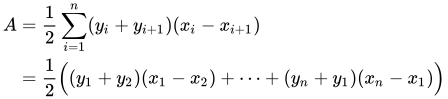
La
Area of an object is the total amount of space enclosed by its shape on flat surface.
Coordinate system is a coordinate-based local, regional or global system used to locate geographical entities. A spatial reference system defines a specific map projection, as well as transformations between different spatial reference systems.
Flux de travail
- Emlid Flow
- Emlid Flow 360
Pour appliquer l'outil Inverse dans l'application Emlid Flow, suivez ces étapes :
-
Ouvrez le projet dans Emlid Flow.
-
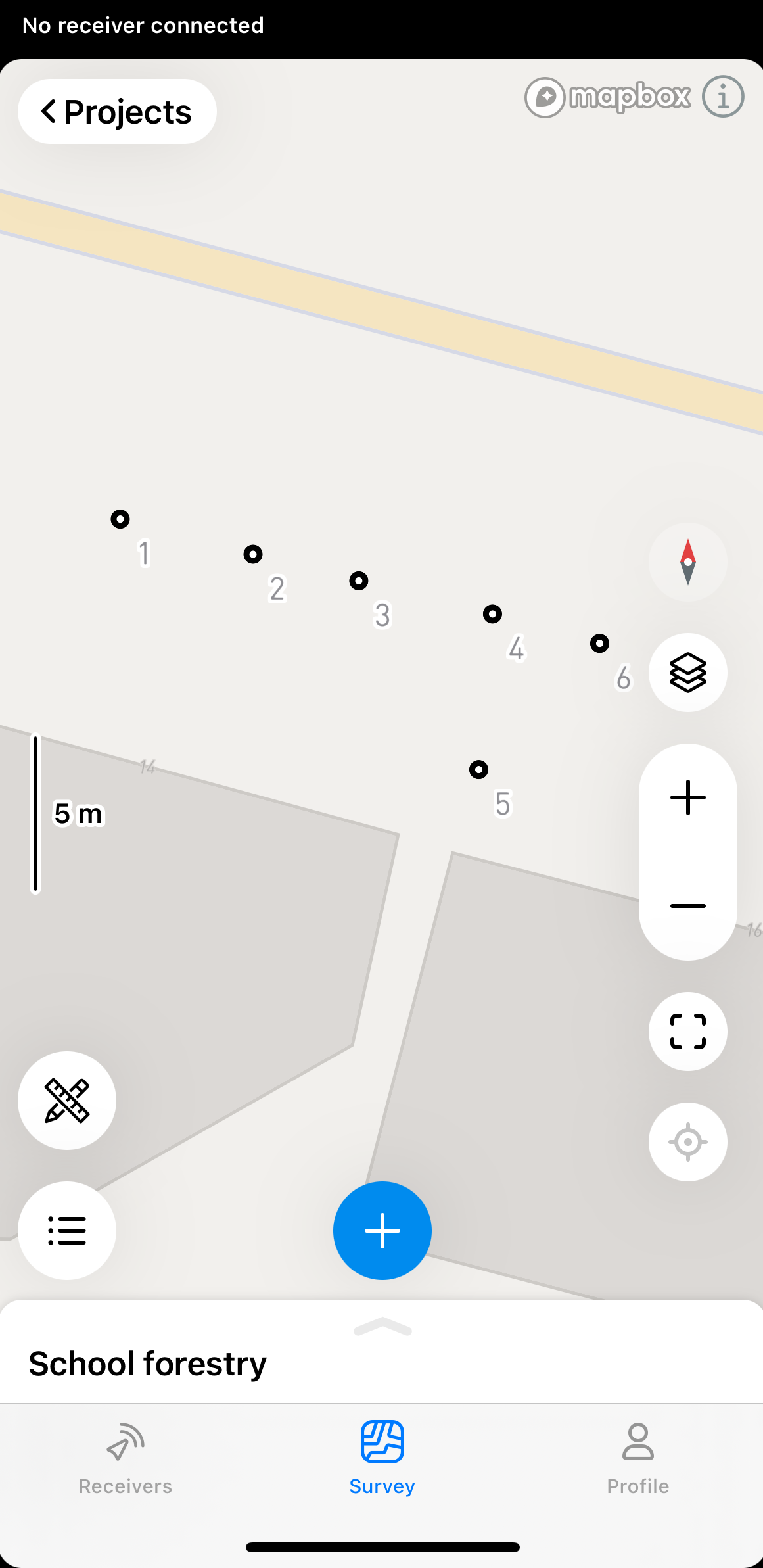
Appuyez sur le bouton des outils dans le coin inférieur gauche de l'écran.
-
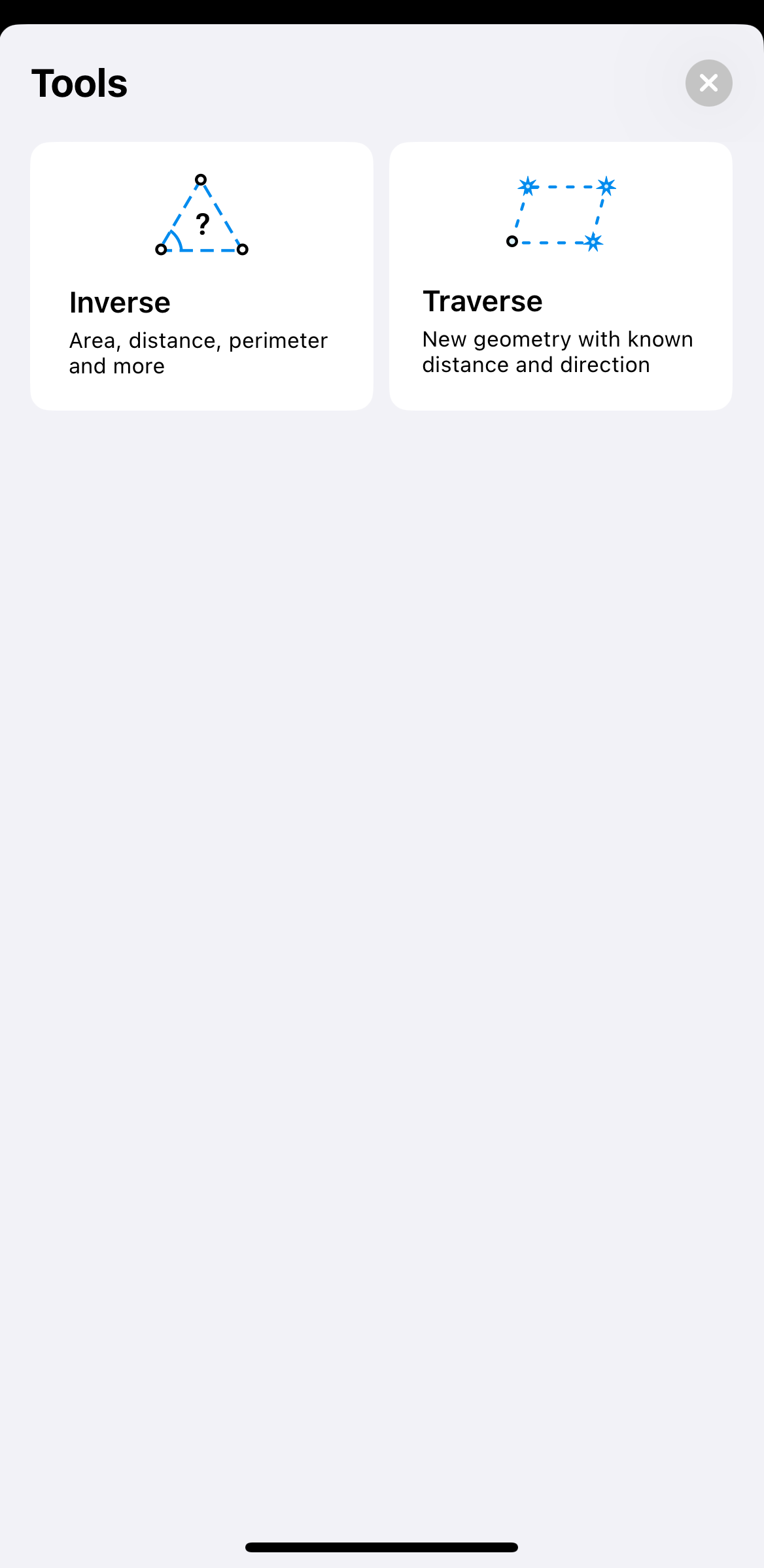
Appuyez sur Inverse.
-
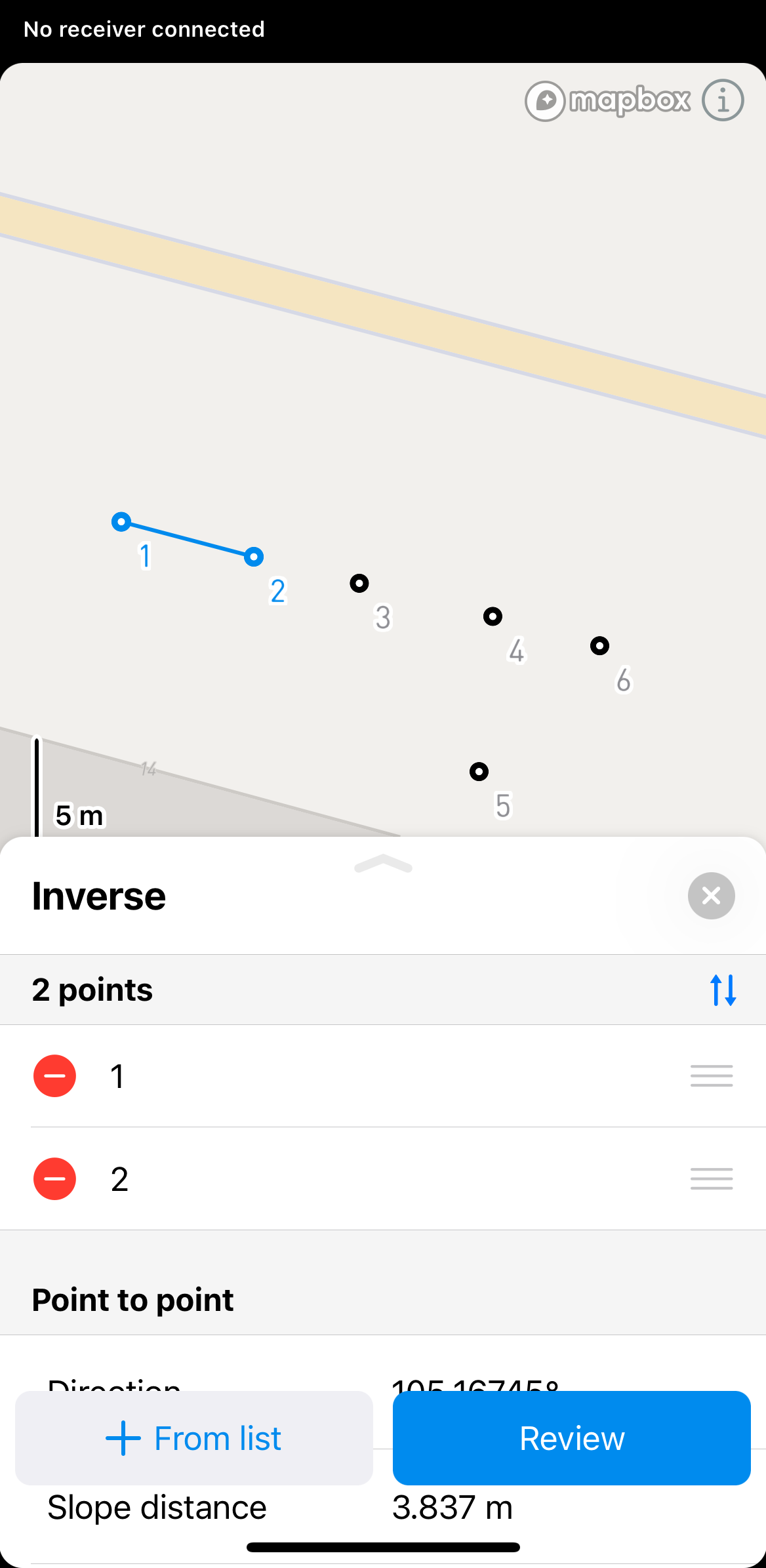
Sélectionnez les points pour lesquels vous souhaitez calculer l'inverse sur la carte ou la liste d'objets.
 astuce
Dans Emlid Flow & Emlid Flow 360, vous pouvez également trouver les informations point à point, ligne et ligne fermée pour chaque ligne. Pour voir ces informations, il suffit d'appuyer sur la ligne.
-
Cliquez sur Review (Vérifier) pour voir les résultats calculés. Pour calculer les résultats pour plus de deux points, utilisez les boutons de flèche pour passer à un ensemble différent de deux points.
remarqueLes résultats affichés seront différents en fonction des points sélectionnés. Si vous sélectionnez 2 points, vous verrez les calculs point à point. Si vous sélectionnez 3 points, vous verrez également les calculs sur la surface, le périmètre de la pente, le périmètre 2D, l'angle intérieur et extérieur.
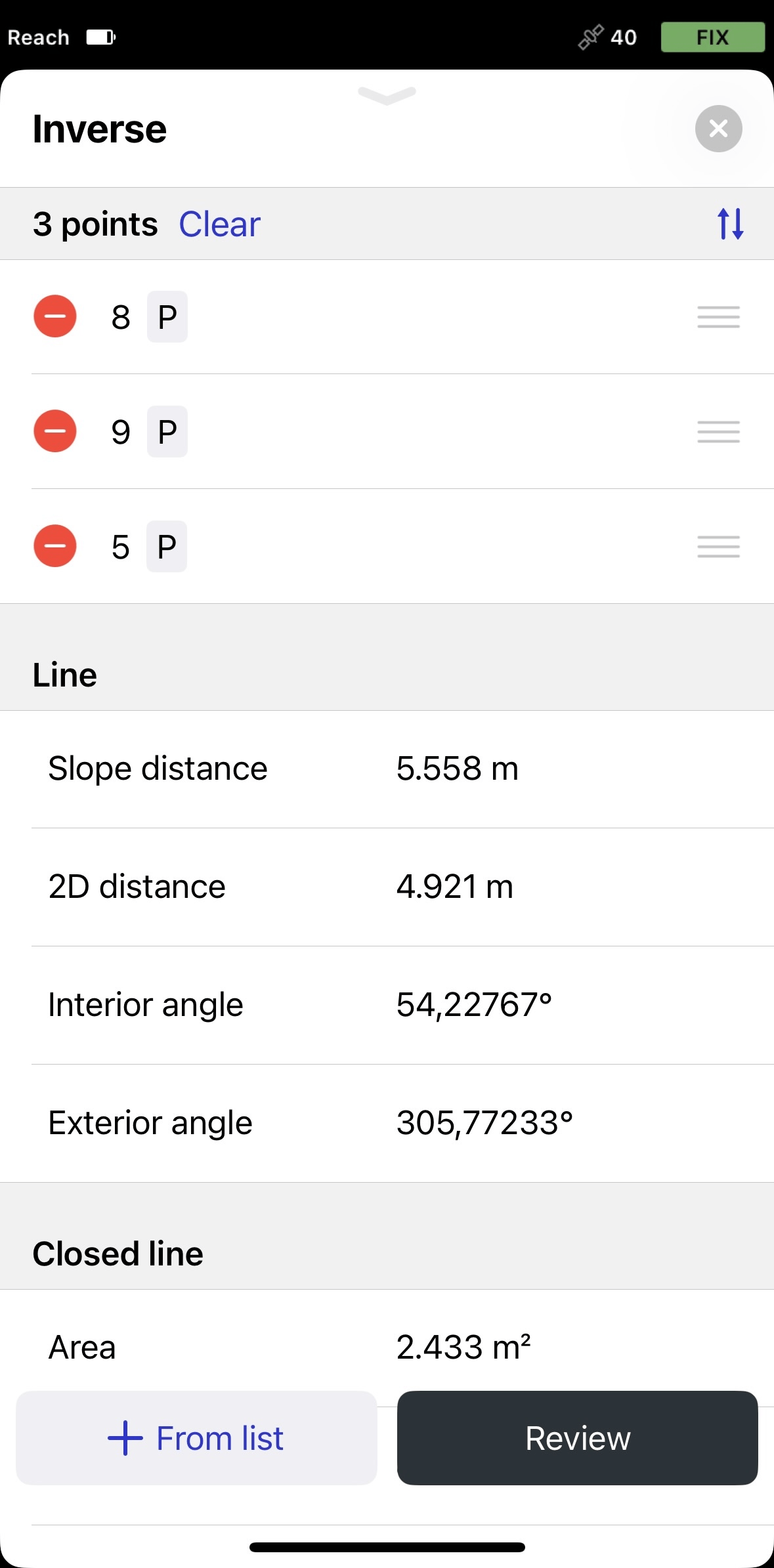 remarque
Vous ne pouvez utiliser la ligne fermée et la ligne que pour les mesures géométriques. Il n'est pas possible de les importer ou de les exporter en tant que figures géométriques.
astuceVous pouvez changer l'ordre des points dans la section Inverse en les faisant glisser et en les déposant. Pour supprimer un point, appuyez sur le bouton de suppression.
-
Pour quitter le mode de calcul Inverse, appuyez sur le bouton de fermeture dans le coin supérieur droit.
Pour appliquer l'outil Inverse dans l'application Emlid Flow 360, suivez ces étapes :
-
Ouvrez le projet dans Emlid Flow 360.
-
Appuyez sur Inverse en haut de l'écran pour calculer les résultats.
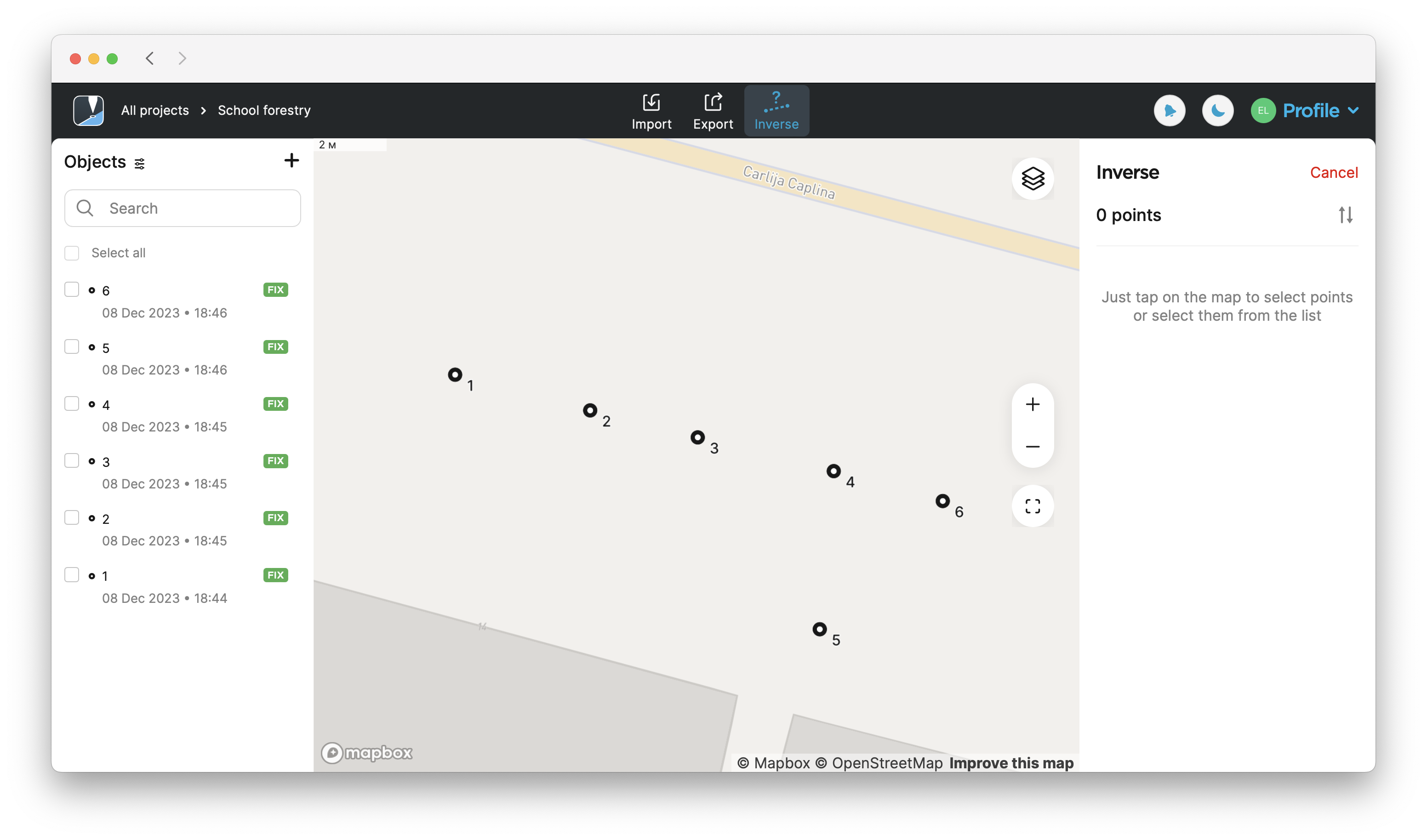
-
Sélectionnez les points pour lesquels vous souhaitez calculer l'inverse sur la carte ou la liste d'objets.
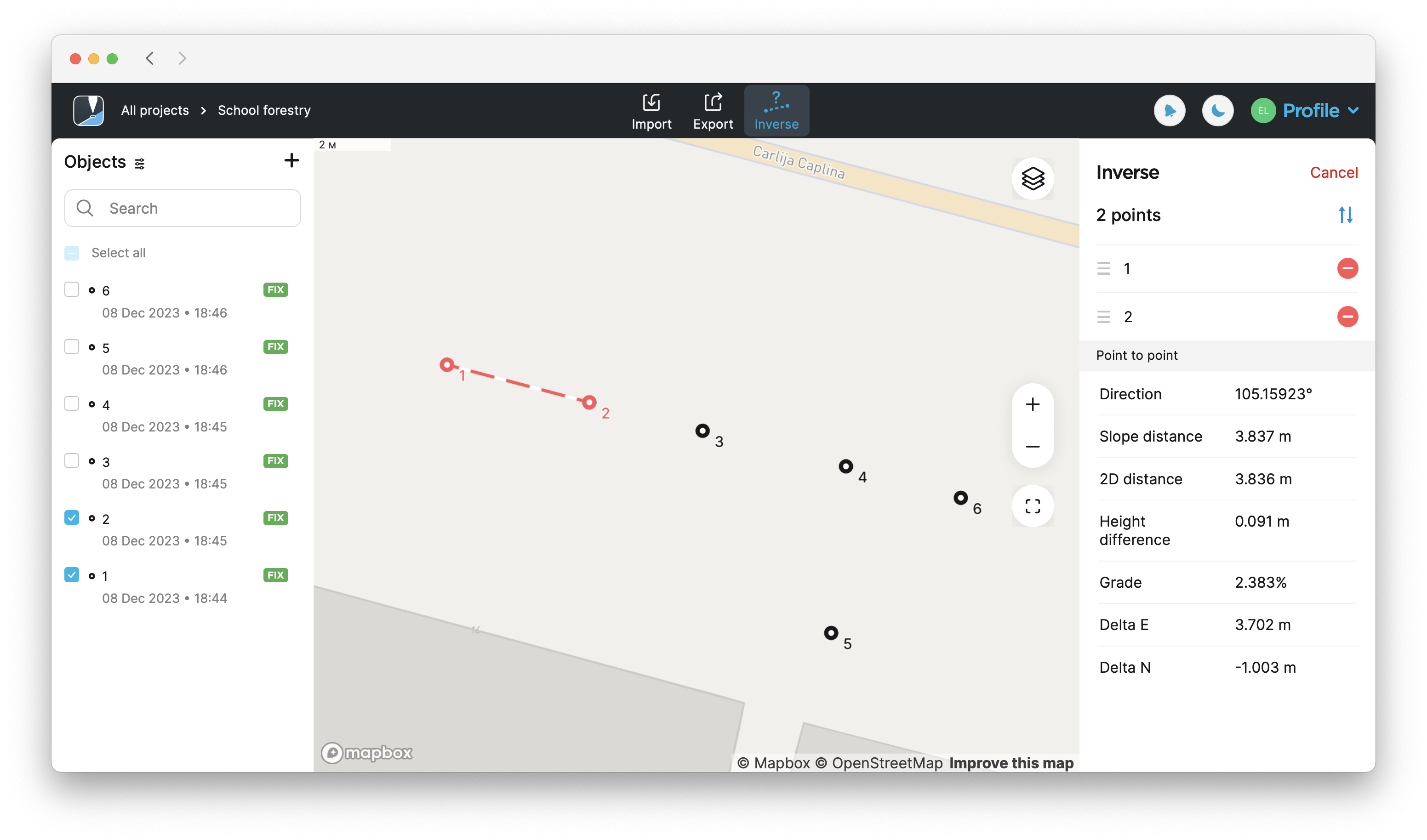 astuce
Dans Emlid Flow & Emlid Flow 360, vous pouvez également trouver les informations point à point, ligne et ligne fermée pour chaque ligne. Pour voir ces informations, il suffit d'appuyer sur la ligne.
-
Trouvez les résultats calculés sur le côté droit de l'écran. Pour calculer les résultats pour plus de deux points, utilisez les boutons de flèche pour passer à un ensemble différent de deux points.
remarqueLes résultats affichés seront différents en fonction des points sélectionnés. Si vous sélectionnez 2 points, vous verrez les calculs point à point. Si vous sélectionnez 3 points, vous verrez également les calculs sur la
surface, leArea of an object is the total amount of space enclosed by its shape on flat surface.
périmètre de la pente, laSlope perimeter of an enclosed object is the sum of slope distances of its sides with the height difference consideration.
distance de la pente, l'angle intérieur et extérieur, etc.Slope distance from point A to point B is the length of the straight line AB, measured along the slope, taking the height difference between the points into account.
remarqueVous ne pouvez utiliser la ligne fermée et la ligne que pour les mesures géométriques. Il n'est pas possible de les importer ou de les exporter en tant que figures géométriques.
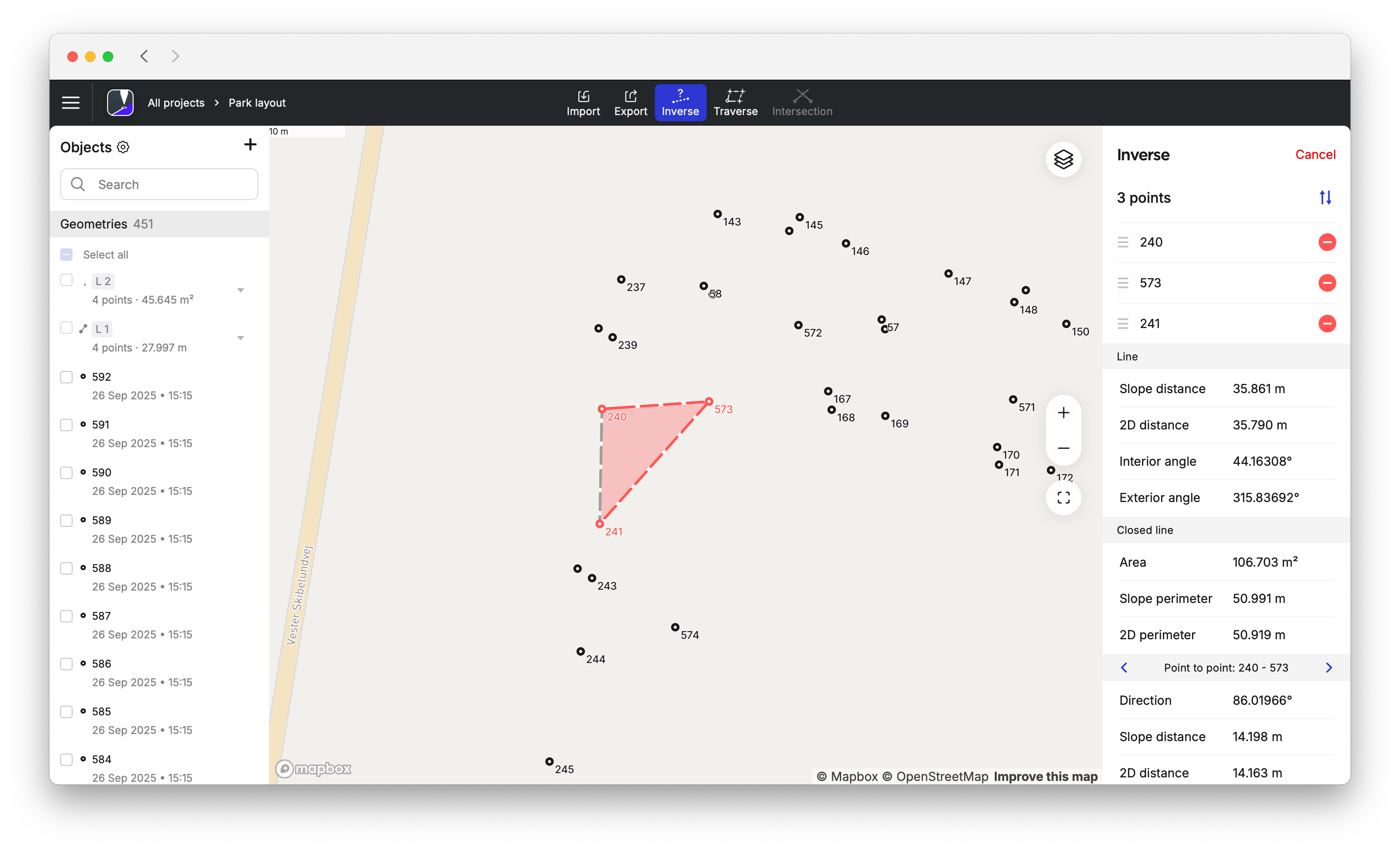 astuce
Vous pouvez changer l'ordre des points dans la section Inverse en les faisant glisser et en les déposant. Pour supprimer un point, appuyez sur le bouton de suppression.
-
Pour quitter le mode de calcul Inverse, appuyez sur Cancel (Annuler) dans le coin supérieur droit.
Guide vidéo
Consultez le flux de travail dans la vidéo ci-dessous :